Before we get into which plugins are best suited for improving Core Web Vitals metrics, lets get a better understanding of what the metrics are, what is considered a good, average, and poor score.
Understanding Core Web Vitals
Core Web Vitals consist of three main metrics, although as of March 12, 2024, FID(First Input Delay) will be replaced by INP (Interaction to Next Paint)
- Largest Contentful Paint (LCP): This metric measures the time it takes for the main content of a page to load. An optimal LCP time is 2.5 seconds or faster, indicating that the main content loads quickly and keeps users engaged.
- First Input Delay (FID): FID measures the time from when a user first interacts with your page (i.e., clicking a link, tapping on a button) to the time when the browser is able to respond to that interaction. A good FID is 100 milliseconds or less.
- Cumulative Layout Shift (CLS): CLS measures the stability of a page as it loads. A low CLS score means the page is stable and doesn’t shift layout elements unexpectedly, which can frustrate users.
For more detailed information, visit Google’s Web Vitals Guide.
Core Web Vitals Metrics & Scores: Good, Needs Improvement, and Poor
LCP (Largest Contentful Paint)
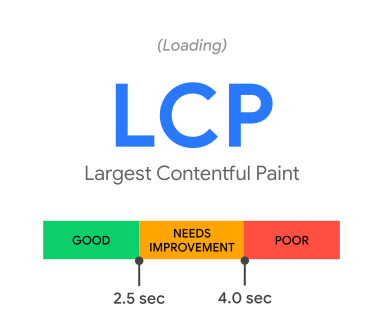
- Good: ≤ 2.5s
- Needs Improvement: 2.5s – 4s
- Poor: > 4s
FID (First Input Delay)
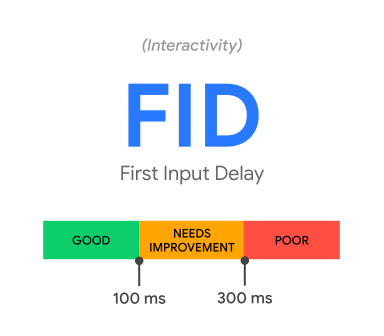
- Good: ≤ 100ms
- Needs Improvement: 100ms – 300ms
- Poor: > 300ms
CLS (Cumulative Layout Shift)

- Good: ≤ 0.1
- Needs Improvement: 0.1 – 0.25
- Poor: > 0.25
INP (Interaction to Next Paint)
- Good: ≤ 200ms
- Needs Improvement: 200ms – 500ms
- Poor: > 500ms
Why Optimize Core Web Vitals?
Optimizing these vitals is crucial for enhancing the user experience, directly influencing conversion, bounce, and, most importantly, SEO rankings. Google has made it clear that these metrics are a part of their ranking algorithm, emphasizing the importance of a fast, responsive, and stable website in achieving higher visibility on the web.
Top 5 WordPress Plugins for Core Web Vitals
Selecting the right tools is essential for improving your website’s performance. Here are the top five WordPress plugins designed to boost your Core Web Vitals:
1. WP Rocket
WP Rocket is a premium caching plugin known for its ability to improve website speed instantly. It optimizes your site’s loading time by caching pages, reducing database bloat, lazy loading images, and minifying CSS and JavaScript files. By doing so, WP Rocket significantly improves LCP and FID, making your website faster and more responsive.
- Features: Page caching, cache preloading, static file compression, images on request, and more.
- Benefits for Core Web Vitals: Reduces load times and improves LCP and FID scores.
Visit WP Rocket for more details.
2. NitroPack
NitroPack is more than just a caching solution; it’s a complete performance optimization service. It automatically implements a wide range of optimizations, including code minification, image compression, and CDN delivery, which boost your site’s speed and tackle all three Core Web Vitals effectively.
- Features: Advanced caching, image optimization, CDN, HTML/CSS/JavaScript optimization.
- Benefits for Core Web Vitals: Improves LCP, FID, and CLS scores by optimizing overall site performance.
Visit NitroPack for more details.
3. Perfmatters
Perfmatters takes a different approach by focusing on the optimization of WordPress itself. It allows you to disable unnecessary features that slow down your site, such as emojis, embeds, and query strings, directly contributing to a faster FID and better CLS.
- Features: Script manager, database optimization, lazy loading, DNS prefetching.
- Benefits for Core Web Vitals: Reduces HTTP requests and optimizes database, improving FID and CLS.
Visit Perfmatters for more details.
4. Asset CleanUp: Page Speed Booster
Asset CleanUp scans your pages and detects the assets (CSS/JS) that aren’t necessary for certain pages. By unloading these resources, the plugin reduces the overall number of HTTP requests and the page size, leading to a quicker LCP.
- Features: Unloads unnecessary scripts/styles, inline CSS/JS files, and reduces HTTP requests.
- Benefits for Core Web Vitals: Improves LCP by decreasing load times and minimizing render-blocking resources.
Visit the Asset CleanUp plugin page for more details.
5. W3 Total Cache
W3 Total Cache is designed to increase the performance of your WordPress site through features like content delivery network (CDN) integration and the minification of CSS, JavaScript, and HTML. This plugin enhances user experience by improving your website’s speed and performance, positively affecting LCP, FID, and CLS.
- Features: CDN integration, browser caching, database caching, object caching, and more.
- Benefits for Core Web Vitals: Enhances overall site speed, improving LCP, FID, and CLS scores.
Visit BOLDGRID for more details.
Choosing the Right Plugin
When selecting a plugin, consider your site’s specific needs. Analyze your Core Web Vitals scores using tools like Google’s PageSpeed Insights to identify areas that need improvement, and choose a plugin that addresses those specific issues.
Implementation Tips
Implementing these plugins effectively requires careful planning:
- Always back up your site before making changes.
- Test the plugin in a staging environment if possible.
- Monitor your site’s performance and Core Web Vitals scores before and after implementation to measure impact.
Monitoring Core Web Vitals
Regularly monitoring your site’s performance is crucial. Utilize tools such as Google Search Console and PageSpeed Insights to keep track of your Core Web Vitals and make informed decisions about further optimizations.
—
Optimizing your WordPress site for Core Web Vitals is essential for providing a positive user experience and improving your site’s SEO. By choosing and effectively implementing the right plugins, you can significantly improve your site’s performance metrics.